


Most teams do not need a bigger list of leads.
They need a better way to identify the people who are already in-market.
That is what Orbit is for. And today, it is live inside Leadpipe.
What Orbit does
Orbit turns keyword-level research behavior into a usable, person-level audience.
Instead of guessing who might care about your product, you start with the subjects people are actively researching - then narrow that audience into the slice that actually fits your go-to-market.
Not company-level signals. Not “someone at Acme Corp is interested.” The actual person, with their name, email, company, job title, LinkedIn, and an intent score that tells you how actively they are researching right now.
4.44 billion person profiles. 20,735 intent topics. Updated daily.
How it works in practice
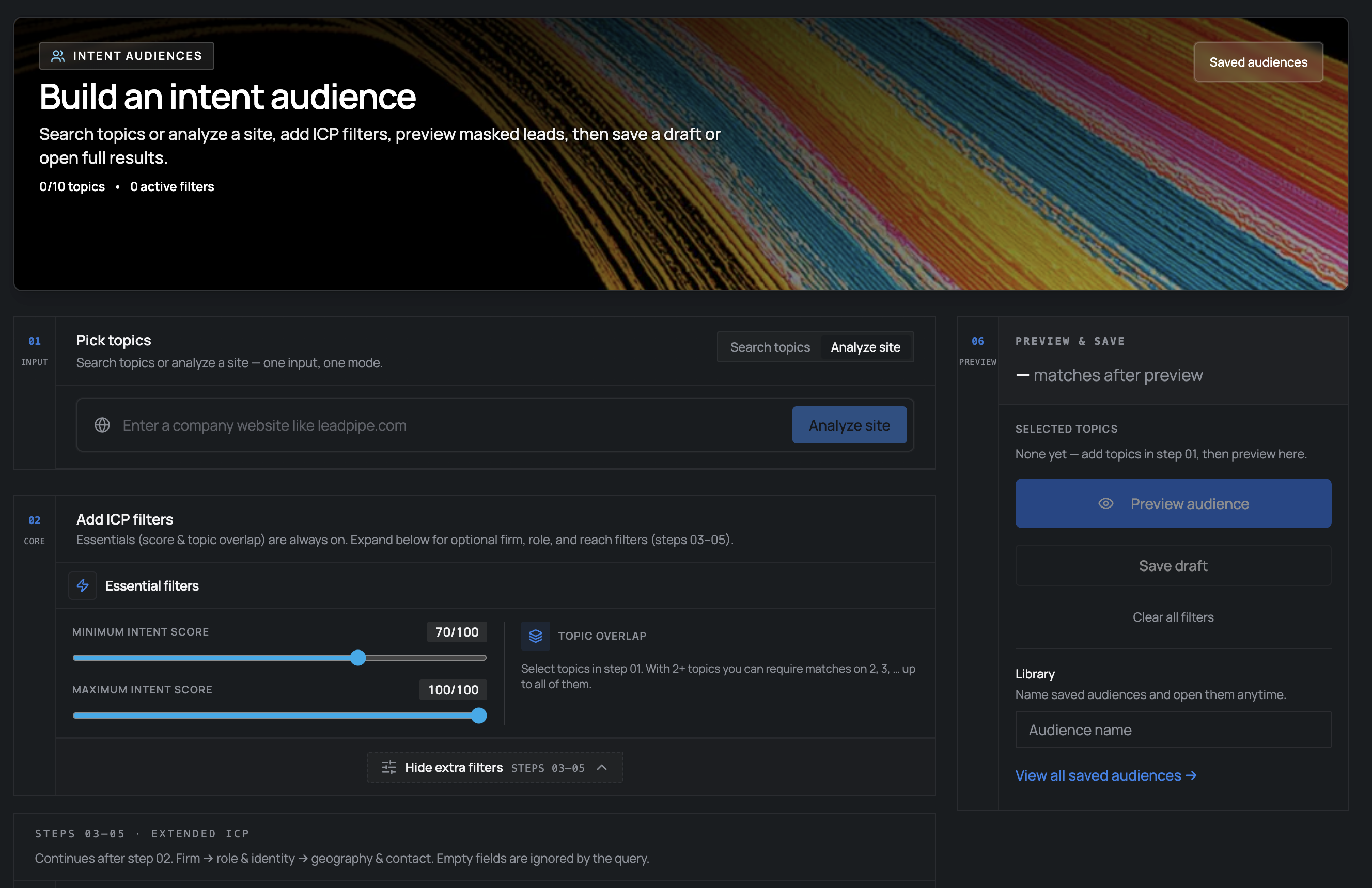
The workflow is simple. No six-month implementation. No “contact sales for access.” You open the audience builder and follow five steps:
1. Find the topics that map to your category
Search or browse 20,735 topics across every industry. These include product categories, competitor names, technology terms, and broad business concepts.
Selling a CRM? Search “CRM” and find topics like “Salesforce CRM,” “HubSpot CRM,” “CRM Migration.” Selling cybersecurity? Topics like “Zero Trust,” “SIEM,” “Endpoint Security.”
You can also paste a competitor’s URL. Orbit scrapes the page, extracts keywords, and matches them to relevant topics automatically.
2. Preview how much demand exists
Before committing anything, preview tells you exactly how many people match - with 50 masked sample profiles so you can see if the audience is real.
This is not a black box. You see the count, the data quality, and a sample before spending a single credit.
3. Narrow with ICP filters
This is where it gets precise. Filter by:
- Seniority - CXO, VP, Director, Manager, Staff
- Company industry - 346 industries
- Company size - from 1-10 to 10,001+
- Department - Engineering, Marketing, Sales, Finance, HR
- Job title - free text search (“VP Marketing,” “Head of Growth”)
- Geography - US state-level
- Revenue range - multiple brackets
- Contact availability - has business email, has phone, has LinkedIn
Want VPs of Marketing at SaaS companies with 50-500 employees who are researching “marketing automation”? That is one query.
4. Save and activate
Save your audience configuration. Activate it. The audience materializes in seconds - typically 5-10 seconds for a few thousand people, 30-60 seconds for 50K+.
5. The audience refreshes daily
This is the part that matters. Orbit is not a one-time export. Active audiences automatically re-materialize every day as new intent signals arrive.
Someone who was at score 65 last week might spike to 92 this week after visiting three competitor pricing pages. Your audience reflects that. People whose signals decay drop off. New people showing intent appear.
The result is a living audience, not a stale list.
What you get per person
Every person in an Orbit audience comes with full contact and company data - not just a name and a score.
| Category | Fields |
|---|---|
| Contact | Name, email (business + personal), phone, LinkedIn, photo |
| Professional | Job title, seniority, department, headline |
| Company | Company name, domain, industry, size, revenue, location |
| Intent | Score (1-100), matched topics, topic overlap count |
| Demographics | Age range, gender, location |
That is 58 fields per person. Enough to qualify, route, and personalize outreach without touching another enrichment tool.
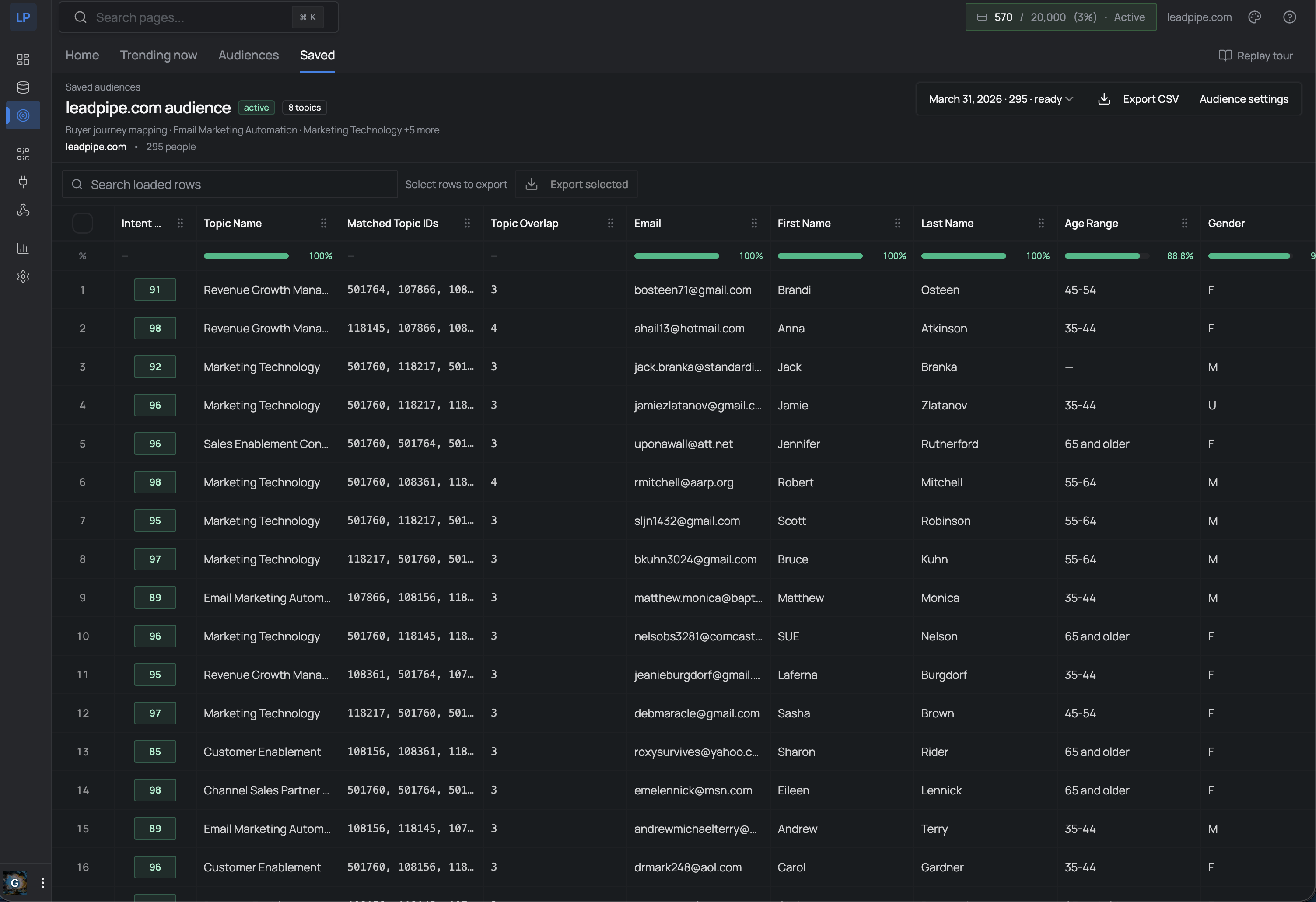
Intent scores: what they actually mean
Every person gets a score from 1 to 100 based on three behavioral signals measured against their individual baseline:
- Recency - how recently they engaged with the topic
- Frequency - how often they engage compared to their normal pattern. A sudden spike (researching cloud computing 5x this week when their baseline is 1x/month) produces a strong signal.
- Decay - scores decrease over time without new activity. Stale leads fall off automatically.
| Score | Level | What it means |
|---|---|---|
| 90-100 | High intent | Consistent, recent, frequent engagement. Strong buying signal. |
| 70-89 | Medium intent | Above-baseline research activity. Active evaluation phase. |
| 60-69 | Low intent | Slight interest. Early stage, good for nurture. |
| Below 60 | Interest only | General topic affinity. No purchase signal. |
Scores refresh daily. The same person can go from 65 to 92 in a week if their research spikes.
Who this is for
Sales teams who want to prospect people already researching their category - not cold contacts from a two-year-old database.
AI SDR platforms that need a real-time signal to decide who to contact and when. Orbit provides the data layer AI sales agents are missing.
Demand gen teams running ABM campaigns who need to build audiences of in-market decision-makers at target accounts.
Platforms and agencies building products that need embedded intent data. Orbit is available via API and SDK - install @leadpipe/client from npm and start querying topics programmatically.
RevOps teams piping intent signals into their data stack for lead scoring, attribution, and pipeline forecasting.
What makes this different from Bombora, 6sense, or G2
Most intent data providers tell you which company is showing interest. That is useful for ABM targeting, but it leaves your sales team guessing which person to contact.
Orbit resolves to the individual person. Not “Acme Corp is researching CRM” - but “Jane Smith, VP of Sales at Acme Corp, has been researching CRM tools with a score of 87.”
| Orbit (Leadpipe) | Bombora | 6sense | G2 | |
|---|---|---|---|---|
| Level | Person | Company | Company | Company |
| Topics | 20,735 | 12,000+ | Varies | Software only |
| Daily refresh | Yes | Weekly | Varies | Varies |
| ICP filtering | 16 filters | Limited | Limited | Limited |
| API / SDK | Full API + TypeScript SDK | Limited | Enterprise-gated | Limited |
| Self-serve | Yes | No | No | No |
| Pricing | Included in plans | $25K-300K/yr | $25K-100K+/yr | Custom |
The other difference: Orbit is self-serve. No six-month sales cycle. No $50K minimum. It is part of Leadpipe, available on every plan.
For developers: the SDK is live
If you are building a product that needs intent data - an AI agent, a sales tool, an analytics platform - Orbit is accessible via our open-source TypeScript SDK.
npm install @leadpipe/clientimport { Leadpipe } from "@leadpipe/client";
const client = new Leadpipe({ apiKey: process.env.LEADPIPE_API_KEY });
// Search topics
const topics = await client.intent.topics.search({ q: "CRM", limit: 10 });
// Preview audience
const preview = await client.intent.audiences.preview({
topicIds: [1234, 5678],
minScore: 70,
filters: { seniority: ["VP", "Director"], hasBusinessEmail: true }
});
// Create and activate
const audience = await client.intent.audiences.create({
name: "CRM Buyers - VP+",
config: { topicIds: [1234, 5678], minScore: 70, filters: { seniority: ["VP", "Director"] } }
});
await client.intent.audiences.update(audience.data.id, { status: "active" });Topic discovery is free - no API key required. Audience building needs authentication.
Full SDK docs: github.com/leadpipe-com/sdk
Try it
Orbit is live now inside every Leadpipe account. If you have a Leadpipe account, open the dashboard and you will see Intent Audiences in the sidebar.
If you do not have an account yet:
No credit card. No sales call. You will have access to the full audience builder, 20,735 topics, and all ICP filters within minutes.
Most teams do not need more leads. They need the right leads at the right time. That is what Orbit is built for.
Related Articles
- Person-Level Intent Data: How It Works
- Leadpipe Intent API: 20,000 Topics, Person-Level
- The Data Layer AI Sales Agents Are Missing
- Intent Data vs Visitor Identification: The Difference
- How to Choose a Data Provider for Your AI SDR
- Visitor Identification API: Complete Developer Guide
- Identity Data as a Service: The API-First Approach